
AI automation: what works, what fails and what it costs
I built a job search automation, ran it for several months, and hit hidden costs and failures AI marketing won’t mention.
My approach
- The goal is to test AI automations from a non-developer’s perspective and to see what I can recommend as a developer.
- Everything I describe I tested personally. I used it for real for several months to draw proper conclusions.
- I expect real usefulness from a solution, not a wow effect for the audience.
- I won’t paste prompts and code here. They would make this article much longer and they are not relevant to the conclusions.
Job search automation
A simplified description of the automation I built to verify what AI can do for a non-developer.
Inputs:
JOB_ROLE- job title, e.g. Clojure Developer / Solution ArchitectCV- PDF formatJOB_PORTALS- list of job portals to search
Searching steps:
- search the defined list of job portals for remote B2B job offers from US / EU companies for people living in the EU for JOB_ROLE.
- do not search blacklisted sites
- if any portal fails to load, e.g. due to anti-bot protection, include a note in the final report
- beyond the defined portal list, search the web for company career pages
- include only listings from the last 7 days
- if the same offer appears on multiple portals, aggregate it
- use Firecrawl MCP to fetch page content
Output:
Generate an HTML report with a table containing the following columns
- date added
- company country flag
- link to the job offer
- daily rate, estimate if not listed
- compare the found job offers with my CV and rate the match on a scale from 1 to 5
- notes
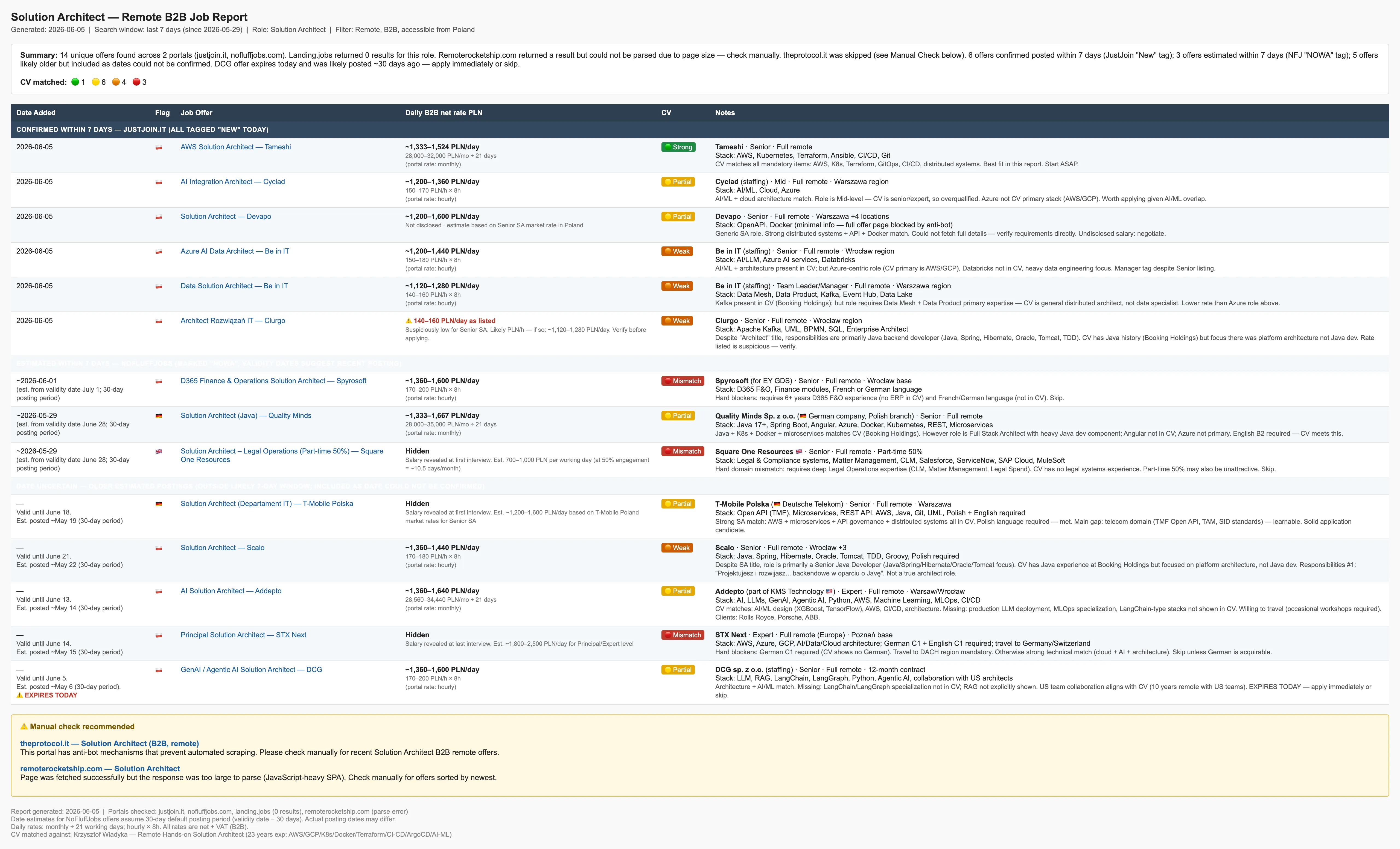 The image is output from Skill.
Implementation
Tests I ran and the conclusions I drew.
AI selection
This article is not about comparing AI models, but I had to pick one. The pricing model is similar across all providers, so it doesn’t matter much for this context.
Tools I used:
Prompt
The first version was a prompt directly in Claude Chat. I started by describing the task as precisely as possible.
In each iteration I discovered a new problem and added more instructions. For example, AI couldn’t read some job portals because of anti-bot protection. Firecrawl works for some portals but not all. So I added an instruction to include a note in the report when a portal can’t be loaded.
A prompt can’t be thrown together carelessly. It needs as much effort as code, but doesn’t require developer skills. After many iterations I ended up with 170 lines / 12,000 characters to get results that are actually useful. That’s a lot for a prompt.
Problems and hidden costs:
- A prompt this large is harder to control and change than code.
- It is too easy to accidentally delete chat and lose whole work. Copy & paste as backup is needed.
- Each run generates a report with slightly different content and format. I have no control over the report template.
- Adding a template would increase complexity and generate additional costs on every run.
- When the AI provider updates the model, the automation and report also change slightly in unpredictable ways.
- Every iteration costs money. The Pro plan allows 2-3 runs per 6 hours. That pace is not viable for serious work.
- You can pay per API token instead of a monthly subscription, but that gets expensive even during prompt prototyping.
- You can’t properly estimate the token cost of a task. AI companies hide how many tokens a task would use when you’re on a subscription plan.
- Cost optimization is out of your control and expensive in itself, because every run has a real, measurable cost.
- The more control you want over what steps the automation takes and what ends up in the report, the longer the prompt gets, and the more each run costs.
In summary, I built a working job search automation. I don’t have full control over how it runs or what the final report looks like. But I have some control through written instructions, and given the time invested, it’s a good enough prototype.
Skills
The Prompt version doesn’t allow searching for multiple jobs with different CVs. I rewrote the Prompt as a Skill. The Skill is almost the same as the prompt, but has inputs as parameters. The instruction length grows even more, but now I can search for different job titles easily. In practice I can run 2 searches per 6 hours on the Claude Pro plan. A third one hits the limit.
This solution works for personal use, but not for a product you sell. If I wanted to build a job aggregation portal for users on top of this automation, the running costs would be absurd. At this stage I have a personal aggregator of current listings for a few job titles.
Hidden issues
The most reasonable way to run the same automation repeatedly in a Claude subscription is Claude Desktop with Scheduled tasks. I set up several tasks using my Skill to search for job offers. Unfortunately, “Scheduled” is just a name, because the computer must be running for the automation to trigger. That means I can’t use the 6-hour window at night while I sleep to save my daytime limit for other AI work.
I start the task. Near the end, it stops because I’ve used up my tokens for the 6-hour window and need to wait for them to reset. There is a Go back / Try again button, but it works sometimes and sometimes it doesn’t. Usually I have to restart the task in a new time window. So I burn tokens in the previous window, get nothing, and now have to burn them again for the same task.
I use Firecrawl MCP because AI sometimes refuses to load certain pages, sometimes it just fails for other reasons. Firecrawl works much more reliably, but it also struggles with anti-bot protection.
and more…
Like any software, it has its own bugs, crashes and downtimes when you can’t use it. This is an additional layer of unpredictable issues.
Server automation
I could connect the job search automation to n8n or another tool. But then I will pay for tokens. The subscription only allows running tasks through Claude apps like Claude Desktop, which requires a running desktop computer. To run it independently on a server, you have to pay per token / API call. That makes prototyping, testing, and every iteration more expensive.
AI token costs — a crypto analogy
AI tasks run on the provider’s server. That means every single run has a token cost.
A good analogy is crypto and blockchain. It works the same way — you pay in tokens there too. But there is one key difference: in crypto you can run a blockchain locally on your computer for testing and development. In AI that’s not possible, because these are not open source, and even if they were, they require computing power no one has at home.
In crypto, you only pay test costs in the production environment. In AI, you pay in every environment, for every person, on every run.
Prompt into code
I asked AI to write TypeScript code that does the same thing as the Skill I wrote earlier. I didn’t specify how the project should be coded or what tools to use. In other words, I stayed at the instruction level and didn’t go down to the code level.
I had to click ‘yes’ roughly 200 times to allow commands to run. Unfortunately “always allow” didn’t work — Claude kept asking. This happens because each curl command is slightly different and Claude doesn’t recognize it as already approved.
This is a process that takes hours, with code being executed repeatedly via commands like npx tsx src/index.ts. It carries real security risks, such as running unwanted code. The idea that you could control this process for security is detached from reality - there is too much code. It relies on trust that AI won’t run anything harmful. If you wanted actual control, the effort would be greater than just writing it yourself and still hard to control.
During coding, AI got stuck on npx tsx src/index.ts because the command ran indefinitely. The stop button didn’t work. I had to restart Visual Studio Code. I told AI it was stuck in an infinite loop and asked it to fix it and continue — it worked.
I did many iterations to improve it, but the generated report was less readable and didn’t include all the data described in the Skill, compared to running everything in AI. At some point I started applying my own coding knowledge to fix bugs alongside the AI.
I consider this step the least useful. I’ll be honest — I expected AI to generate code good enough to recommend as the main solution in this article. The report was uglier and contained worse data. The time spent was too high cost for the result.
It’s worth noting that this solution consumes tokens and can’t run within a subscription plan, so its cost is higher.
I advise against using AI to write code from a Skill. The effect is really bad.
Vendor lock
Partial vendor lock-in to GCP / AWS / etc. is acceptable, even necessary at times. But locking in to an AI provider feels like it works against the purpose of using AI. Your automation should always be able to use the most effective AI for its domain, but this changes over time. Fortunately you can always copy & paste the prompt to a new AI.
Conclusions
- Prompts / skills are good for quick prototyping and small automations with low usage frequency (once a day).
- Prompts are good for visualization. The description of Job search automation is dry and abstract. Adding a screenshot of what AI created improves communication, and it didn’t require a developer or a designer.
- Rewriting prompts / skills into code using AI gives unacceptably poor results.
- AI can’t read current content from many websites. It’s worth using tools like Firecrawl.
How to approach AI solutions?
This is beyond the scope of this article and deserves a separate article, but in short:
low budget
For companies with low budget, paying per token using n8n or another tool is a reasonable choice. Only for low-frequency usage though, because of token costs. AI prompts makes sense for companies that can’t afford to hire experts. It’s a choice between AI vs low-wage workers, or nothing at all. This is the reality for many companies. AI can prepare newsletters, answer simple questions for support tickets, generate images, translate product descriptions into other languages etc.
Start there and move to a more professional version when the time is right.
with budget
The best approach is:
- it must be done by a software developer
- a developer can use AI to help with coding, but the developer must make all the decisions in the project.
- AI makes poor decisions, but can handle execution and verification described by a developer.
- AI speeds up a developer’s work but doesn’t replace them. If the balance is broken, it will hurt the project.
- only the abstract part of the logic is delegated to AI — the part you can’t describe precisely enough to code.
- at some point it’s worth considering whether building your own AI model would be more efficient than paying for tokens.